
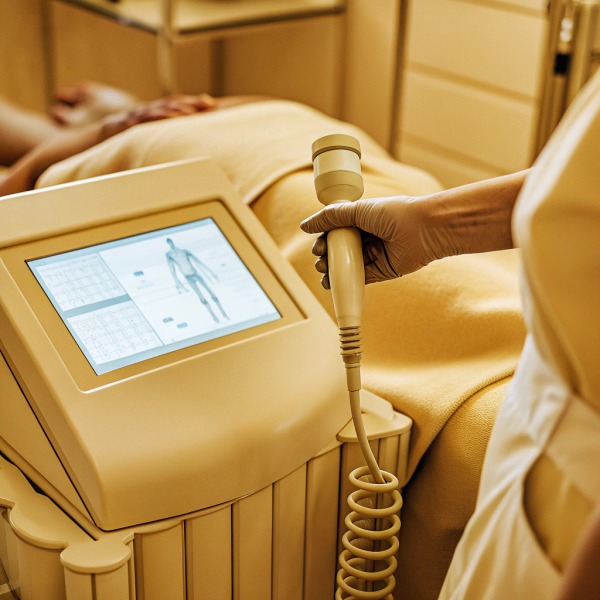
We often notice that even seasoned clinic owners struggle with the initial setup of advanced medical devices, leading to unnecessary downtime or operational errors medical device safety regulations 1. When we engineer our shockwave therapy units, we prioritize creating visual guides because we know that a static manual cannot capture the nuance of a dynamic treatment. Without a clear video tutorial, your staff risks Extracorporeal shockwave therapy 2 mishandling the equipment, potentially voiding warranties or compromising patient safety.
You should explicitly request a comprehensive video tutorial as a mandatory deliverable in your purchase contract, covering machine setup, specific treatment protocols, and routine maintenance. Ensure this video is available as a downloadable file for offline staff training and includes a dedicated section on safety contraindications to comply with medical regulations and liability standards.
To ensure you receive a training tool that actually adds value to your clinic, you must know exactly what to ask for during the negotiation phase.
What specific treatment protocols should I look for in the shockwave therapy video?
We frequently receive technical support calls from clients who are unsure about the correct energy settings for specific orthopedic conditions conditions like plantar fasciitis 3, which delays their ability to treat patients effectively treatment of plantar fasciitis 4. When we calibrate our systems, we define precise parameters, but these can be confusing on a touchscreen interface without a visual walkthrough. A lack of clarity here leads to inconsistent treatment outcomes and frustrated practitioners.
Your video must demonstrate specific protocols for conditions like plantar fasciitis, showing exact energy levels (mJ/mm²), frequency (Hz), and total shock counts. Look for visual demonstrations of proper handpiece positioning, gel application, and the navigation between Quick Start and Preset modes to ensure your team utilizes the device’s full clinical potential.

Visualizing the Interface and Parameters
When we design the user interface for our shockwave therapy machines, specifically the models featuring the blue and white chassis with the digital touchscreen, we integrate a skeletal diagram to assist in area selection musculoskeletal health guidelines 5. However, a static image of this screen in a PDF manual is rarely sufficient. You need to see the workflow in motion. The video tutorial must bridge the gap between the hardware and the clinical application.
A high-quality operation video should start by showing the technician interacting with the white front panel. It needs to clearly display how to toggle between the "Preset Protocols" (which automatically suggest parameters based on the body part selected on the skeletal diagram) and "Manual Mode" (where you adjust the frequency and energy bars yourself). For instance, if you are treating a shoulder calcification, the video should show the operator selecting the shoulder region on the screen, verifying the pre-loaded settings—perhaps 3 bars of pressure at 10Hz—and then physically adjusting the settings if patient tolerance changes.
Radial vs. Focused Technique Demonstration
The most critical part of the protocol video is the physical application. The tutorial must distinguish between different types of movements. For radial pressure waves, the video should demonstrate the difference between "painting" (moving the handpiece over a broad area) and "spot" treatment (holding the handpiece static over a trigger point).
Furthermore, the video should explicitly show the application of coupling gel. We have seen instances where insufficient gel usage led to poor energy transmission and rapid heating of the applicator head. The video must show the correct amount of gel to apply to the skin to ensure the acoustic waves penetrate effectively. If your machine includes different transmitter heads (like 15mm, 20mm, or deep-impact transmitters), the video must show which head corresponds to which protocol.
Protocol Verification Checklist
To ensure the video meets your clinical needs, use the following checklist when reviewing the sample footage provided by the supplier.
| Feature | Requirement in Video | Why It Matters |
|---|---|---|
| Interface Navigation | Clear close-up of the touchscreen skeletal diagram and parameter adjustments. | Ensures staff can quickly find and modify settings without trial and error. |
| Energy Ramping | Demonstration of starting low (e.g., 1.5 bar) and ramping up based on patient feedback. | Prevents patient discomfort and ensures a therapeutic but safe experience. |
| Handpiece Movement | Visuals of rotational vs. linear movements using the blue/black handheld tool. | different conditions require different physical techniques for optimal efficacy. |
| Gel Application | Clear shot of the coupling medium quantity and placement. | Essential for the transmission of shockwaves; prevents skin irritation and energy loss. |
Can I ask the supplier to customize the tutorial with my own brand logo?
We understand that building a cohesive brand identity is difficult medical technology trends 6 when you are relying on generic supplier materials that may feature inconsistent styling or foreign branding. Sending your franchisees a training video that looks like it came from a generic factory undermines the premium image you are working hard white-label product 7 to establish. This disconnect can confuse your staff and dilute your brand’s authority.
Yes, you should negotiate for white-label or customized video content, especially if you are placing a bulk order for private labeling. Request the raw video files to overlay your own logo, or ask the supplier to film the tutorial using a neutral background and your specific machine model to maintain a consistent professional image across your locations.
The Value of White-Label Training Materials
In our experience assisting distributors who supply large salon chains, the consistency of training materials is just as important as the hardware itself. If you are importing our machines and rebranding them, a video featuring our factory logo or Chinese text subtitles will immediately signal to your downstream customers that you are a reseller rather than a manufacturer. This can affect your pricing power and brand perception.
When we engage in OEM (Original Equipment Manufacturer) projects, we often produce "neutral" videos. These are filmed in a clean, clinical studio setting with no visible logos on the background walls or the technician's uniform. The machine featured in the video will be the exact color scheme you ordered—such as the deep blue body with the white interface panel—customized with your logo on the screen software or the physical casing. This allows you to integrate the video directly into your internal Learning Management System (LMS) seamlessly.
Negotiating Customization in Your Contract
Customization requires resources, so it is best to address this early in the negotiation. If you request this after the machines are packed, it is often too late. We recommend asking for the "source files" or "project files" of the video, not just the final MP4. With the source files, your marketing team can swap out intro animations, translate voiceovers into different languages, or cut shorter clips for social media marketing.
If the supplier cannot film a new video from scratch for you, ask for a "clean feed" version—a version of the tutorial without any text overlays or watermarks. This gives you the flexibility to add your own English captions, branding elements, and contact information.
Customization Options vs. Standard Deliverables
Understanding what is standard versus what is a premium request will help you negotiate better terms.
| Deliverable Type | Description | Difficulty/Cost | Best For |
|---|---|---|---|
| Standard Generic | Supplier’s standard video with their logo and English subtitles. | Free / Included | Single unit purchases or trial orders. |
| Clean Feed (Neutral) | Video with no text overlays, logos, or voiceover; just visuals. | Low Cost / Negotiable | Brands with their own video editing team. |
| Full Customization | Filmed specifically with your branded machine, your logo in intro/outro. | Moderate to High Cost | Large distributors or franchise owners. |
| Source Files | Raw footage files delivered for complete editing freedom. | Negotiable (IP concerns) | Companies needing to translate into multiple languages. |
Should I insist on a section covering daily maintenance and troubleshooting?
We have seen too many perfectly good machines returned to the factory simply because a user did not know how to perform basic cleaning or part replacement. When a clinic ignores routine maintenance, the device’s performance drops, leading to expensive repairs and frustrated clients who cancel appointments. A lack of maintenance knowledge is the single biggest cause of avoidable equipment failure.
Absolutely, insisting on a maintenance section is critical for extending the lifespan of your shockwave device and avoiding unnecessary downtime. The video should visually guide staff through projectile replacement, demineralized water filling for focused handpieces, and cleaning procedures to prevent internal clogging and ensure consistent therapeutic energy output over time.

Routine Care for Handpieces and Applicators
The handheld tool—the blue and black component connected by the gray cable—is the workhorse of the machine. Inside this handpiece, a projectile (often called a bullet) moves back and forth projectile (often called a bullet) 8 at high speeds to generate the shockwave. Over time, this bullet wears down. If we do not instruct our clients on how to change this, the bullet can deform, damaging the inner tube and requiring a full handpiece replacement, which is costly.
A good maintenance video must show a close-up, step-by-step process of unscrewing the applicator head, removing the old projectile, cleaning the chamber with the provided brush, and inserting the new projectile. It should also specify the visual signs of wear—showing a side-by-side comparison of a "good" bullet versus a "worn" bullet. This visual reference is infinitely more useful than a text description in a manual.
Troubleshooting Common Error Codes
Modern devices with touchscreens often display error codes when something goes wrong. For example, if the handpiece overheats or if the foot pedal is disconnected, the screen might flash a warning. The video tutorial should simulate these errors.
We recommend asking for a "Troubleshooting Simulation" chapter. This should show the technician deliberately triggering a common error (like disconnecting the gray cable while the machine is on) and then demonstrating the correct fix. This empowers your clinic staff to solve minor issues on-site in minutes, rather than waiting days for an email response from the supplier. It also builds confidence in the reliability of the machine, as staff know exactly what to do if a warning light appears.
Essential Maintenance Visuals Checklist
Ensure the video covers these specific maintenance tasks to keep your blue and white unit running smoothly.
| Maintenance Task | Visual Detail Required | Frequency Context |
|---|---|---|
| Bullet Replacement | Close-up of opening the handpiece, removing the projectile, and reassembly. | Every 1-2 million shocks (approx). |
| O-Ring Check | Showing where the rubber O-rings are located and how to grease or replace them. | Monthly or when suction/pressure drops. |
| Ventilation Cleaning | Showing how to clean the air vents on the main blue body to prevent overheating. | Weekly cleaning routine. |
| Cable Inspection | proper coiling of the gray cable to prevent internal wire breakage. | Daily after every shift. |
How do I ensure the video includes clear instructions on safety and contraindications?
We work closely with regulatory consultants who warn us that the primary cause of liability lawsuits in aesthetic and medical treatments is improper application on contraindicated patients. If your staff treats a patient with an underlying condition because they were never visually trained on what to avoid, your clinic faces severe legal and reputational risks. A manual is often skimmed, but a video makes safety protocols unavoidable and memorable.
Require the supplier to include a dedicated safety segment detailing contraindications such as pregnancy, tumors, or coagulopathy to protect your practice from liability. This section should demonstrate how to explain risks to patients and verify safe anatomical zones on the touchscreen’s skeletal diagram before initiating any high-energy shockwave treatment.

Visualizing Contraindications on the Touchscreen
Safety is not just about what you do; it is about what you do not do. The operation video should include a segment where the operator navigates to the "Warnings" or "Contraindications contraindications such as pregnancy 9" tab on the digital display, if available. On our machines, we often include a startup disclaimer that must be acknowledged. The video should emphasize reading this, not just tapping through it.
More importantly, the video should use the skeletal diagram to visually highlight "Red Zones." For shockwave therapy, the lungs, brain, and spinal cord are generally off-limits. The video should show the handpiece approaching these areas and then a clear visual "STOP" indicator or a cross overlay, reinforcing that the shockwaves must not be directed there. This visual reinforcement is far more effective for memory retention than a bulleted list of body parts.
Patient Communication and Safety Checks
A truly professional tutorial also covers the patient interaction aspect of safety. We suggest asking for a role-play segment where the practitioner asks the patient standard screening questions: "Do you have a pacemaker?", "Are you pregnant?", or "Have you had a cortisone injection in the last 6 weeks?"
The video should also demonstrate the "Pain Feedback Loop." It should show the operator starting the treatment, looking at the patient’s face, and asking for a pain level rating (1-10). It should demonstrate adjusting the frequency or energy down on the white front panel if the patient indicates discomfort above a certain threshold. This teaches your staff that the machine settings are secondary to patient response, which is a core tenet of safe medical practice.
Safety Protocols to Verify in Videos
Use this table to audit the safety section of the video provided by your supplier.
| Safety Element | Video Content | Risk Mitigation |
|---|---|---|
| Anatomical Bans | Graphic overlays showing lungs/spine/eyes as "No-Go" zones. | Prevents severe internal injury. |
| Patient Screening | Scripted Q&A session verifying patient history before power-on. | Avoids treating contraindicated conditions. |
| Hygiene Protocol | Cleaning the blue/black handpiece with alcohol between patients. | Prevents cross-contamination. |
| System Self-Check | Showing the machine's boot-up self-test sequence. | Ensures the device is calibrated before use. |
Conclusion
Requesting a detailed, high-quality operation video is not just a training aid; it is a strategic step in quality control and risk management ISO 13485 quality management 10. By insisting on specific content covering protocols, branding, maintenance, and safety, you ensure that your investment in our shockwave therapy technology delivers consistent, safe results for your patients while protecting your brand's reputation.
Footnotes
1. Official FDA guidance on postmarket requirements for medical device safety and compliance. ↩︎
2. General background information on the history and application of shockwave therapy. ↩︎
3. Cites a meta-analysis confirming the efficacy of shockwave protocols for this condition. ↩︎
4. Clinical research overview regarding the efficacy and protocols for treating plantar fasciitis. ↩︎
5. WHO fact sheet providing global context on musculoskeletal conditions treated by shockwave therapy. ↩︎
6. Recent news coverage on the healthcare and medical device manufacturing sector. ↩︎
7. Definition and business context for the white-labeling process mentioned in the article. ↩︎
8. Explains the ballistic mechanism of radial shockwave generation described in the text. ↩︎
9. References authoritative standards of care regarding safety and contraindications. ↩︎
10. International standard for quality management systems specific to the medical device industry. ↩︎

 English
  Español de México
  Deutsch
  Français
  العربية
  Русский