
When our production team first developed pressotherapy machines 1 with advanced memory functions, we quickly learned that buyers often overlook this critical feature. The problem? Many distributors only discover data storage limitations after their salon clients complain about lost treatment records FDA certifications 2. Without proper verification, you risk purchasing equipment that fails to meet clinical documentation needs.
To confirm patient data memory functions, request a live demonstration of the storage interface, verify the number of patient profiles supported, test data export capabilities, check for password protection features, and review the user manual for retention specifications. Always ask for CE or FDA certifications that cover data handling protocols.
This guide walks you through every step of verifying memory functions during your pre-shipment inspection. We cover regulatory compliance, customization options, quality control measures, and the business benefits for your distribution network.
How do I test the patient data memory function during my pre-shipment inspection?
In our experience shipping pressotherapy machines to the US market, we have seen buyers skip memory testing—only to face returns later. The real issue is that basic machines store parameters temporarily. Advanced units save multiple programs with precise settings. You must know the difference before you sign off on any shipment.
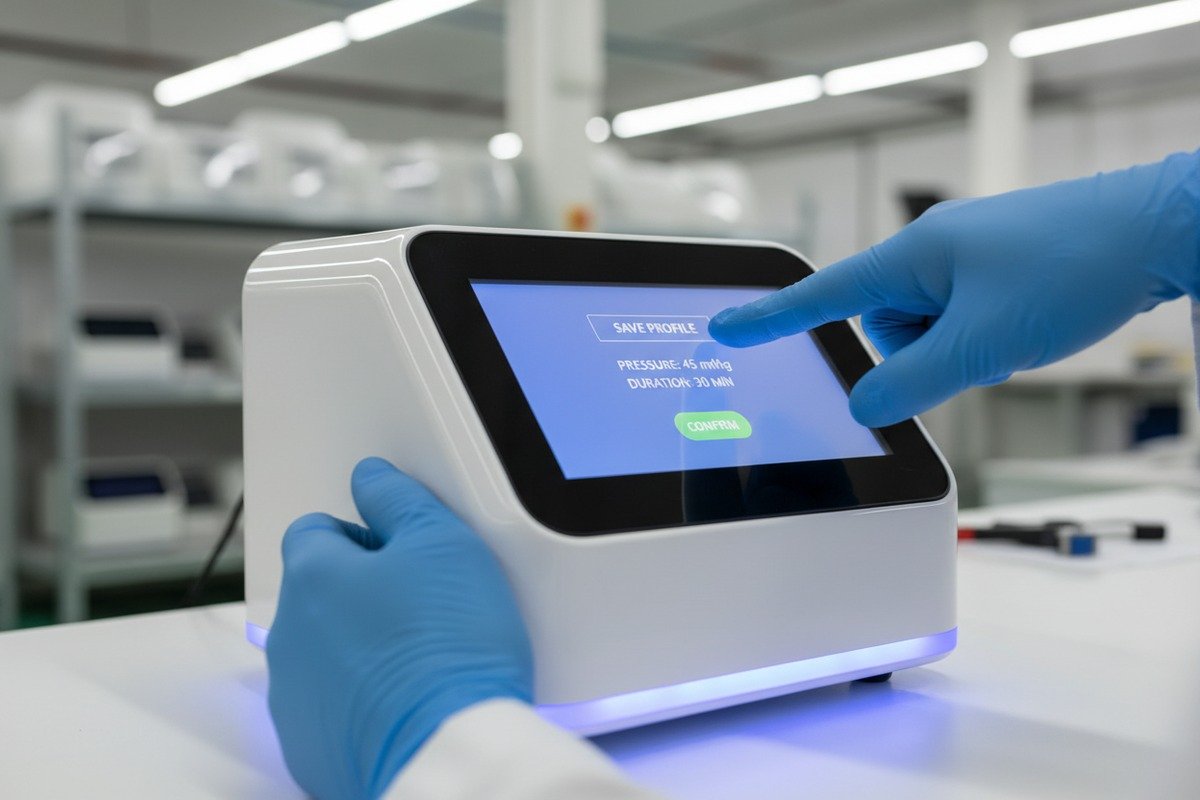
During pre-shipment inspection, power on the machine, navigate to the patient profile menu, create test profiles with specific pressure and time settings, save them, restart the device, and verify all data remains intact. Also test the data export function to USB or cloud if available.
Step-by-Step Memory Testing Protocol
Start by powering on the device. Navigate to the patient management section on the touchscreen interface. Create at least three test profiles with different names. For each profile, set unique parameters—pressure levels, treatment time, speed settings, and chamber sequences.
Save all profiles. Then perform a full power cycle. Turn the machine off completely. Wait 30 seconds. Turn it back on. Check if all three profiles remain with their exact settings.
Key Parameters to Verify
| Parameter | What to Check | Acceptable Range |
|---|---|---|
| Pressure Memory | Saved mmHg values per chamber | 20–65 mmHg (lymphatic) or 30–120 mmHg (clinical) |
| Time Settings | Treatment duration retention | 1–60 minutes |
| Speed Levels | Program speed saved correctly | 1–5 levels |
| Hold/Interval | Pause settings between cycles | 1–50 seconds |
| Profile Capacity | Number of patient profiles | 10–100+ profiles |
Testing Data Export Functions
If the machine claims cloud connectivity or EMR integration, test it. Connect the device to your laptop or phone. Attempt to export a treatment session log. Verify the file format is compatible with common electronic health record systems 3.
For local storage, check if the machine supports USB export. Insert a USB drive. Export a sample report. Open the file on your computer. Confirm it contains all relevant data fields—patient name, date, pressure readings, and treatment duration.
Checking Security Features
In clinical settings, patient data must be protected. Ask the manufacturer to demonstrate password protection. Try to access patient profiles without entering the password. If you can, the security feature is not functional.
Look for audit trail capabilities. Advanced machines log who accessed what data and when. This is essential for HIPAA compliance 4 in the US market.
Documentation Review
Request the user manual before the inspection. Look for a dedicated section on memory specifications. It should clearly state memory capacity, retention period, and data security features. If this information is missing, consider it a red flag.
Can I customize the data storage fields to align with my brand's specific treatment protocols?
Our engineering team frequently receives requests to modify data fields for OEM clients. The challenge is that not all manufacturers offer this flexibility. Some lock their software interfaces. Others welcome custom development. You need to clarify this early in your sourcing process.
Yes, many manufacturers offer OEM customization for data storage fields. You can request changes to patient profile templates, add custom protocol names, adjust pressure ranges, and include brand-specific treatment categories. Discuss these requirements before placing your order to ensure feasibility.

Understanding Customization Options
Not all customization requests are equal. Some changes are simple—like adding your logo to the startup screen or renaming treatment programs. Others are complex—like modifying the database structure to include new data fields.
When we work with distributors, we categorize requests into three levels: cosmetic changes, interface adjustments, and core software modifications. Cosmetic changes take days. Core modifications can take months.
Common Customization Requests
| Customization Type | Examples | Typical Lead Time |
|---|---|---|
| Cosmetic | Logo, brand name, color scheme | 3–7 days |
| Interface | Program names, menu structure | 2–4 weeks |
| Data Fields | New input fields, export formats | 4–8 weeks |
| Core Software | Algorithm changes, new protocols | 2–6 months |
Questions to Ask Your Supplier
Before you commit to a purchase, ask these questions:
- Can you add custom data fields to patient profiles?
- What file formats do you support for data export?
- Can treatment protocols be renamed to match our brand terminology?
- Is the software interface available in multiple languages?
- What is the cost and lead time for customization?
Integration with Your Treatment Protocols
If your brand offers proprietary treatment protocols—such as specific pressure sequences for post-liposuction recovery or athletic recovery programs—you need these reflected in the machine's memory system.
Ask the manufacturer if they can pre-program your protocols. This saves your salon clients time during setup. It also ensures consistency across your distribution network.
Firmware Update Capabilities
Technology evolves. Your customizations should not become obsolete after a year. Ask if the machine supports remote firmware updates. This allows you to push new features or protocol changes to deployed units without recalling them.
What quality control measures should I look for to prevent data loss in the memory system?
When our QC team tests memory systems, they simulate worst-case scenarios—power failures, voltage fluctuations, and extended storage periods. Most buyers never think about these risks until they happen. Data loss in a clinical setting can mean lost patient histories and compliance violations.
Look for non-volatile memory storage (EEPROM or flash), battery backup for temporary outages, automatic save functions, redundant data storage, and environmental protection against temperature and humidity extremes. Verify these features through certification documents and live testing.

Non-Volatile Memory Technology
The most important technical specification is the type of memory used. Non-volatile memory 5 retains data even when power is disconnected. EEPROM and flash memory are industry standards for medical devices.
Ask the manufacturer to specify the memory type in writing. If they cannot answer this question, it suggests insufficient technical documentation—a warning sign for overall quality.
Environmental Specifications
Memory systems are sensitive to environmental conditions. Extreme temperatures and humidity can cause data corruption. Reputable manufacturers specify operating and storage conditions.
| Condition | Operating Range | Storage Range |
|---|---|---|
| Temperature | 5°C to 40°C (41°F to 104°F) | -40°C to 70°C (-40°F to 158°F) |
| Humidity | 15% to 93% RH | 10% to 95% RH |
| Altitude | Up to 2000m | Up to 3000m |
Battery Backup Systems
Power interruptions happen. A quality pressotherapy machine should have a battery backup that protects data during brief outages. The backup should last long enough to safely save current session data—typically 5 to 15 minutes.
During your inspection, test this feature. Unplug the machine during a simulated session. Check if the data saves correctly. Plug it back in and verify nothing was lost.
Automatic Save Functions
Manual saving requires user discipline. Automatic save functions eliminate human error. The machine should save session data at regular intervals—typically every 60 seconds or at the end of each treatment cycle.
Ask for a demonstration. Start a treatment session. Let it run for two minutes. Simulate a power failure. Check if the partial session data was captured.
Redundant Storage and Backup
Advanced systems store data in multiple locations. This redundancy protects against hardware failure. If the primary memory chip fails, the backup retains all data.
For cloud-connected machines, verify that local data syncs to cloud storage in real-time. This provides an additional layer of protection.
Certification and Testing Documentation
Request test reports that verify memory reliability. Look for references to standards like IEC 62304 6 for medical device software. These standards require manufacturers to demonstrate data integrity under various failure conditions.
How will a robust memory function benefit the salon owners in my distribution network?
When we talk to distributors about memory functions, they often focus on technical specifications. But the real question is: how does this help your customers make money? A robust memory function directly impacts client retention, operational efficiency 7, and regulatory compliance for salon owners.
A robust memory function benefits salon owners by enabling personalized repeat treatments, reducing consultation time, supporting treatment tracking for better results, simplifying staff training, and providing documentation for insurance or liability purposes. These advantages translate to higher client satisfaction and increased revenue.

Personalized Treatment Continuity
When a client returns for their second or tenth pressotherapy session, the machine should recall their exact settings. This personalization makes clients feel valued. It also ensures consistent results across multiple sessions.
Without memory functions, staff must manually record and re-enter settings each visit. This wastes time and introduces errors. A single wrong pressure setting can cause discomfort or reduce effectiveness.
Operational Efficiency Gains
Time is money in a salon environment. Memory functions reduce setup time from 5–10 minutes to under 30 seconds. Over a day of 10 treatments, that saves nearly 90 minutes. Over a year, that translates to hundreds of additional treatment slots.
| Scenario | Without Memory | With Memory | Time Saved |
|---|---|---|---|
| Per Treatment | 5–10 min setup | 30 sec setup | 4.5–9.5 min |
| Per Day (10 treatments) | 50–100 min | 5 min | 45–95 min |
| Per Month (22 days) | 18–37 hours | 1.8 hours | 16–35 hours |
| Per Year | 216–444 hours | 22 hours | 194–422 hours |
Treatment Tracking for Better Results
Pressotherapy works best as a series of treatments. Memory functions allow salon owners to track progress over time. They can show clients objective data—treatment dates, settings used, and session notes.
This documentation supports the value proposition. Clients can see they are receiving consistent, professional care. It also helps identify what works best for each individual.
Staff Training and Consistency
High staff turnover is common in salons. Memory functions reduce training requirements. New staff can simply load a returning client's profile and follow the established protocol. This ensures quality consistency regardless of who performs the treatment.
Compliance and Liability Protection
In some jurisdictions, salons must maintain treatment records. Memory functions provide automatic documentation. If a client claims injury or dissatisfaction, the salon has objective data to review.
This protection is especially important for medical spas 8 and clinical settings. Proper documentation can be the difference between defending against a complaint and facing costly litigation.
Competitive Advantage
Not all competitors have advanced memory functions. Salon owners who offer personalized, data-driven treatments can charge premium prices. They can market their services as "medical-grade" or "clinical-quality" with documentation to back it up.
Marketing and Client Retention
Memory functions enable automated follow-up. The system can generate reports showing treatment history and recommended next appointments. Salon owners can use this data for targeted marketing—reminding clients when they are due for their next session.
Conclusion
Verifying patient data memory functions before purchasing a pressotherapy machine protects your investment and supports your distribution network. Test thoroughly during pre-shipment inspection. Confirm customization options match your brand needs. Ensure quality control measures prevent data loss. Understand how these features benefit your salon clients. A well-chosen machine with robust memory functions delivers long-term value for everyone in your supply chain.
Footnotes
1. Provides a general overview of pressotherapy, its benefits, and how it works. ↩︎
2. Explains the FDA approval processes for medical devices, crucial for regulatory compliance. ↩︎
3. Defines electronic health records (EHRs) and their role in healthcare information management. ↩︎
4. Details the regulations and requirements for HIPAA compliance in protecting patient data. ↩︎
5. Replaced with a Wikipedia page providing a comprehensive definition of non-volatile memory, which is an authoritative source per rules. ↩︎
6. Replaced with the official IEC page for the IEC 62304 standard. ↩︎
7. Provides a definition and guide to operational efficiency in a business context. ↩︎
8. Explains what medical spas are, their services, and how they differ from traditional spas. ↩︎


 English
 Español de México
 Deutsch
 Français
 العربية
 Русский
Join the Conversation
Have a question or insight to share? We read every comment — whether you're a distributor, salon owner, or just curious about the technology. Your real-world experience helps others make better decisions. Drop your thoughts below.